
Understanding AI resolutions in SparrowDesk

AI Agents can resolve customer queries independently without human involvement. This article explains what qualifies as an AI resolution, how SparrowDesk identifies them, and how you can track usage for billing purposes.
What is an AI resolution?
An AI resolution occurs when an AI agent independently understands a customer request, provides the appropriate response, and completes the conversation without a human agent’s intervention.
A conversation is considered AI-resolved when either of the following conditions is met:
Confirmed resolution
After Zoona’s final response, the customer sends an affirmative reply such as:
- “Thank you”
- “That helped”
- “It worked”
There must be no exchanges after this in the next 24 hours. This confirms that the AI has successfully resolved the issue.
Assumed resolution
- After Zoona’s final response, the customer leaves without replying
- And, there are no further exchanges after that for 24 hours
The resolution may be confirmed or assumed. In both cases, the conversation is counted as an AI resolution and included in billing.
What does not count as an AI resolution?
A conversation is not counted as an AI resolution, and is not billed, when:
- The customer sends a follow-up question within 24 hours.
- Zoona AI hands the conversation off to a human because it can't resolve it — for example, it has no matching knowledge, the customer asks for a human, or a workspace escalation rule fires.
- A human agent answers the conversation, so the AI didn't resolve it on its own. If a human later hands the conversation back to Zoona AI, evaluation starts fresh from that handover, and only the AI's work after it is counted.
Handoffs you set up as a deliberate step in a Command are the exception. These are billed — see When Command handoffs count as resolutions below.
When Command handoffs count as resolutions
A Command can hand a conversation off to a human team as a deliberate step. When it does, the conversation counts as an AI resolution and is billed like any other.
This applies when:
- A Command runs because its trigger matched- an intent was detected or a condition was met.
- The Command includes a step that assigns the conversation to a human team or inbox.
- That handoff step runs successfully.
The handoff is an outcome you designed, not a fallback. Zoona AI evaluated the conversation and carried out the action you set up, so it counts as a resolution — the same as if Zoona AI had answered the customer directly.
If the customer has already asked for a human, or a workspace escalation rule fires, the conversation is not billed as a Command handoff — even when a Command handoff also runs on it.
When a charge is reversed
If a conversation was already counted and billed as an AI resolution and is later escalated to a human, SparrowDesk re-checks it. If the re-check finds the AI didn't resolve it after all, the charge is reversed: the resolution is removed from your usage and from your AI-resolved reports, any free-trial credit is returned, and the conversation is no longer marked as AI resolved.
A handoff that a Command performs as a deliberate step is not reversed, since it already counts as a resolution.
How AI resolutions are identified
After the AI sends its final reply, SparrowDesk waits 24 hours before evaluating the conversation for an AI resolution.
The 24-hour countdown runs from Zoona's most recent reply. If Zoona replies again, the timer restarts, so the wait is always 24 hours from the last AI message.
If a confirmed or assumed resolution is detected:
- The conversation is marked as AI resolved
- The resolution is included in AI resolution billing
Significance of the 24-hour cooling period for AI resolved tickets
There is a 24-hour cooling period before the evaluation for AI-responded conversations.
This cooling period ensures that:
- Only completely resolved conversations are counted as AI resolutions
What happens after the cooling period?
If the customer sends a new message after 24 hours, it is treated as a new conversation, even if:
- It continues in the same thread
- It carries the same conversation ID
These follow-up messages do not affect the original AI resolution count.
Why the 24 cooling period matters
The cooling period ensures that AI resolution billing remains:
- Fair
- Accurate
- Aligned with actual usage
In most cases, messages sent after 24 hours relate to a new issue, which should be evaluated and resolved independently.
The diagram below shows how SparrowDesk determines whether a conversation qualifies as an AI resolution.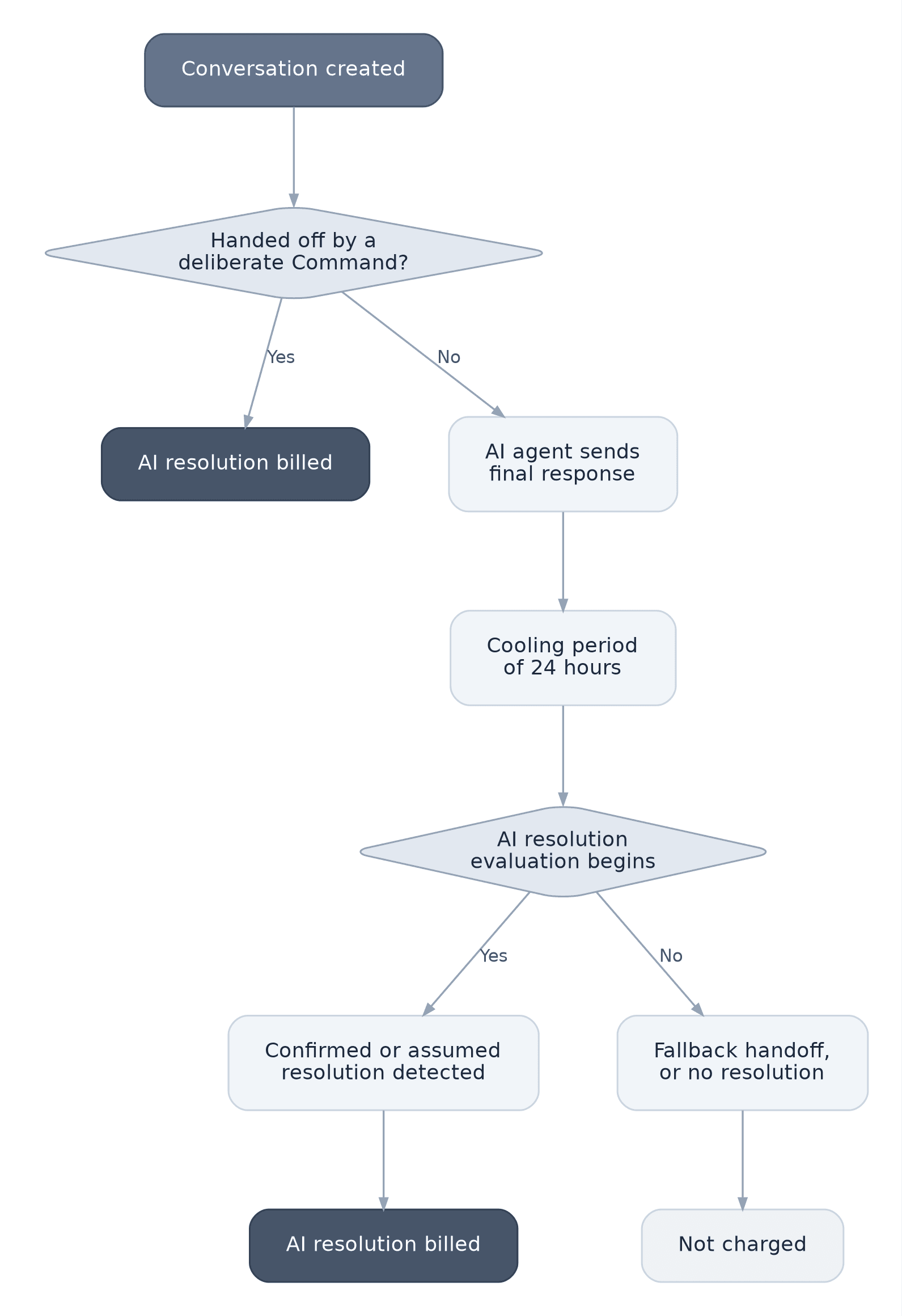
Tracking AI resolutions
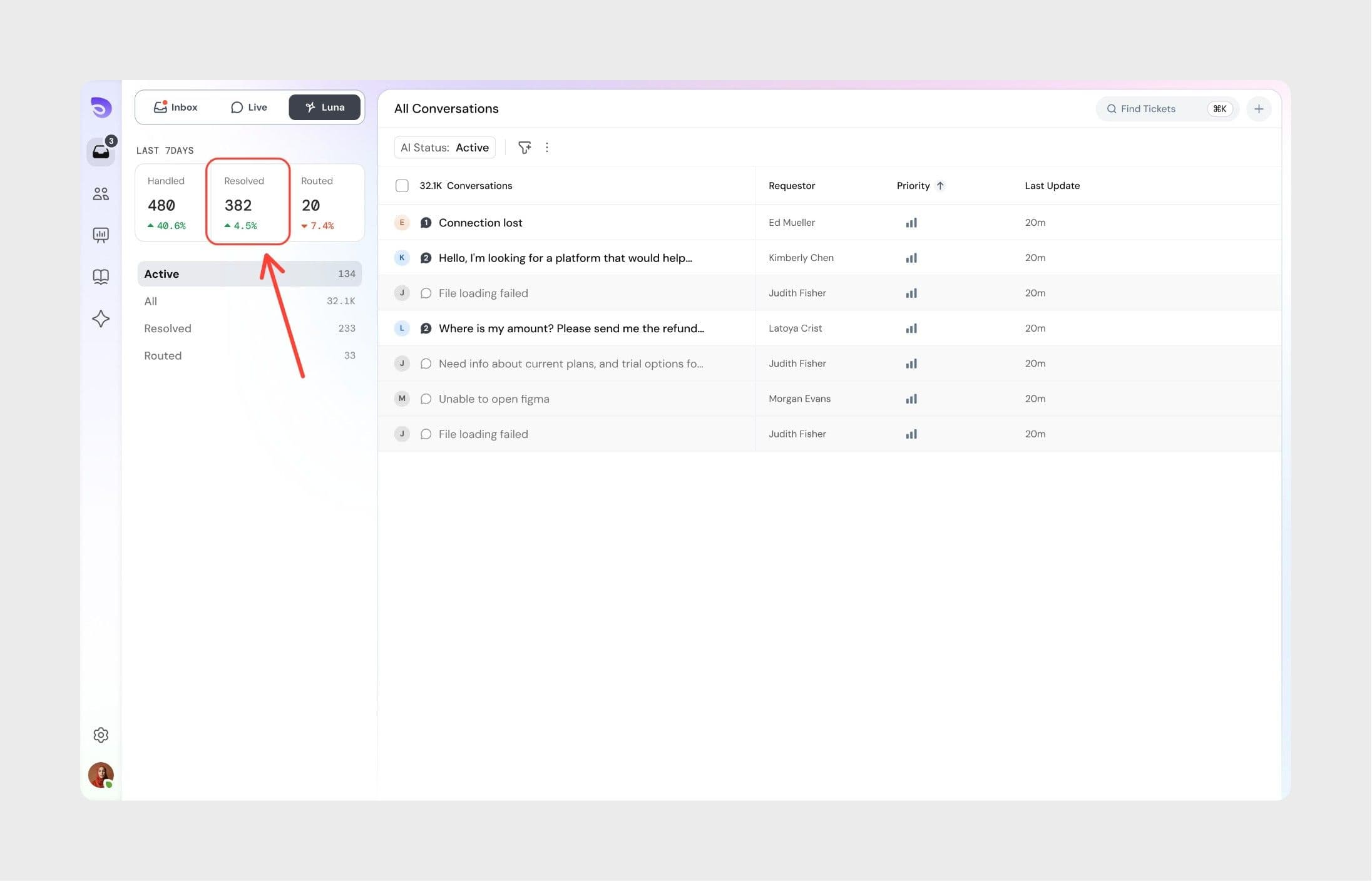
You can track AI resolutions from both the AI agent dashboard and the billing page.
Accessing the Zoona dashboard
- Log in to SparrowDesk
- Click Zoona in the left panel
- View AI resolutions alongside routed and handled conversation counts
Accessing billing details
- Log in to SparrowDesk
- Click Settings
- Select Billing under Workspace
- Click Usage details
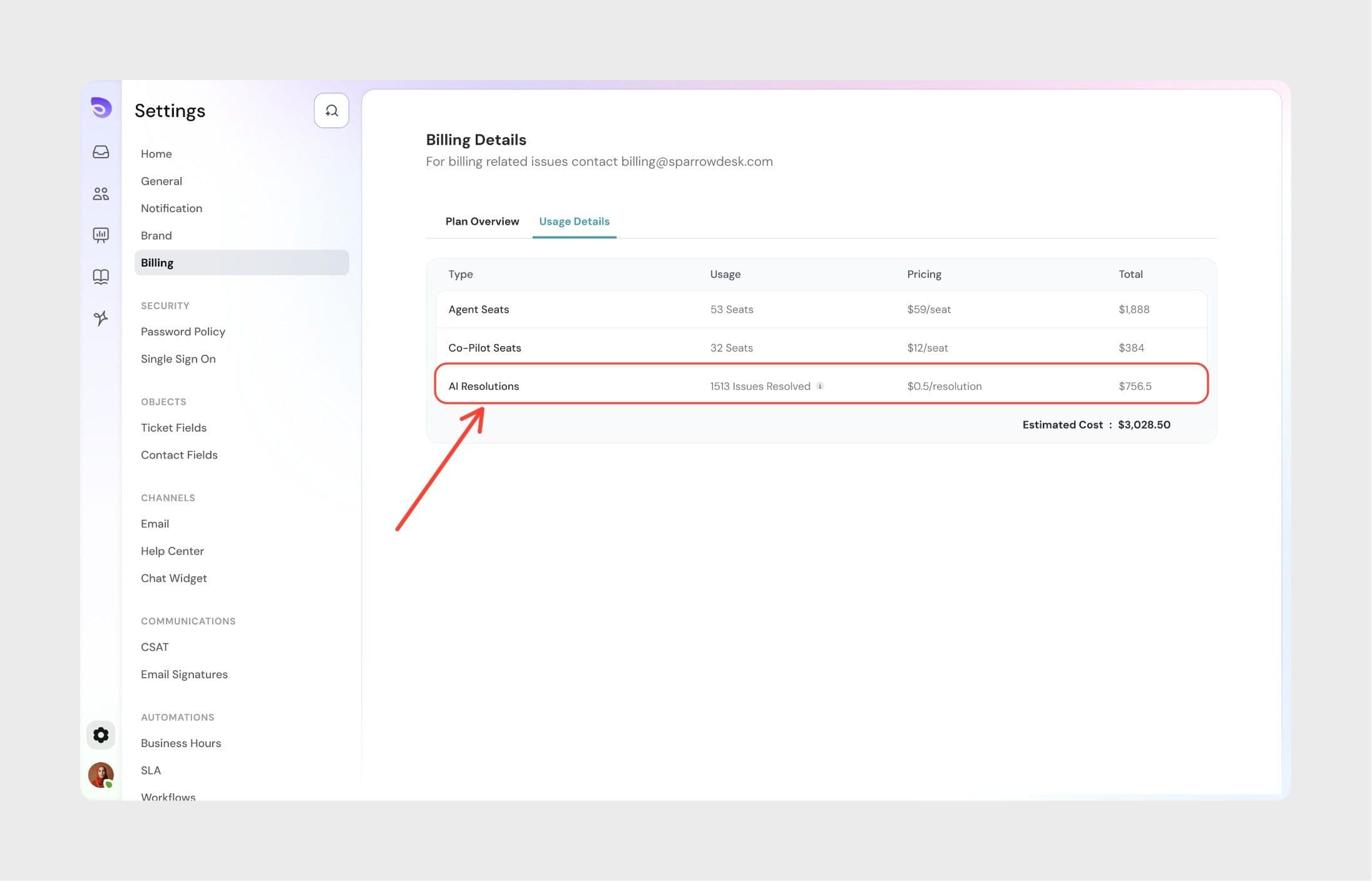
- Total AI resolutions for the current billing cycle
- Corresponding usage cost
Important: The first 30 AI resolutions are free in SparrowDesk. Subsequent AI resolutions will be charged appropriately. See pricing
Best practices for better AI resolutions
To improve the AI agent’s resolution accuracy and effectiveness:
- Keep knowledge base content up to date
- Add clear and well-structured answers
- Train on common and recurring support scenarios
- Review AI-resolved conversations regularly
- Check and act on optimization suggestions in the Improvements tab
Following these practices helps ensure higher resolution rates and more reliable AI performance.
Frequently Asked Questions
1. How much does an AI resolution cost?
AI resolutions cost $0.49 per resolution. However, the first 30 AI resolutions are free and the billing starts only from the subsequent ones. For more information read: AI copilot and AI resolution billing.
2. Does an assumed resolution cost the same as a confirmed resolution?
Yes. Both assumed and confirmed resolutions cost $0.49. The resolution type doesn't affect the cost.
3. Are AI resolutions billed if a customer replies after 24 hours?
No. Messages sent after the 24-hour cooling period are treated as a new conversation and do not affect the current AI resolution.
4. What happens if a conversation is reopened during the cooling period?
If the customer replies within the 24-hour cooling period, the conversation is not considered AI-resolved.
5. Are AI resolutions counted if a human agent later joins the conversation?
It depends on why the handoff happened. If Zoona AI hands off because it can't resolve the issue, the customer asks for a human, or a workspace rule fires, the conversation is not billed. If a Command you set up hands the conversation off as a deliberate step, it is billed as a resolution. If a conversation was already billed and is then escalated to a human, the charge is reversed, unless the handoff was a deliberate Command step.
6. Where can I see AI resolution usage for my workspace?
You can view AI resolution counts in the Zoona dashboard and on the Billing → Usage details page for the current billing cycle.
7. Why are assumed resolutions counted as billable AI resolutions?
If a customer does not respond after receiving relevant information, SparrowDesk treats the issue as resolved. This ensures billing reflects successful AI-assisted outcomes, even when customers don’t explicitly confirm.
8. What happens if a Command's handoff step fails?
No resolution is billed. The charge applies only when the handoff runs successfully. If an earlier step in the Command fails before the handoff is reached, nothing is billed either.
9.Can the same conversation be billed more than once? No. Each conversation is charged at most once. If it is evaluated again after already being counted, it is not billed a second time.