
AI Copilot and AI Resolution billing

SparrowDesk has two AI add-ons that are billed differently: AI Copilot and AI Resolutions. Here’s how each works.
AI Copilot Credits
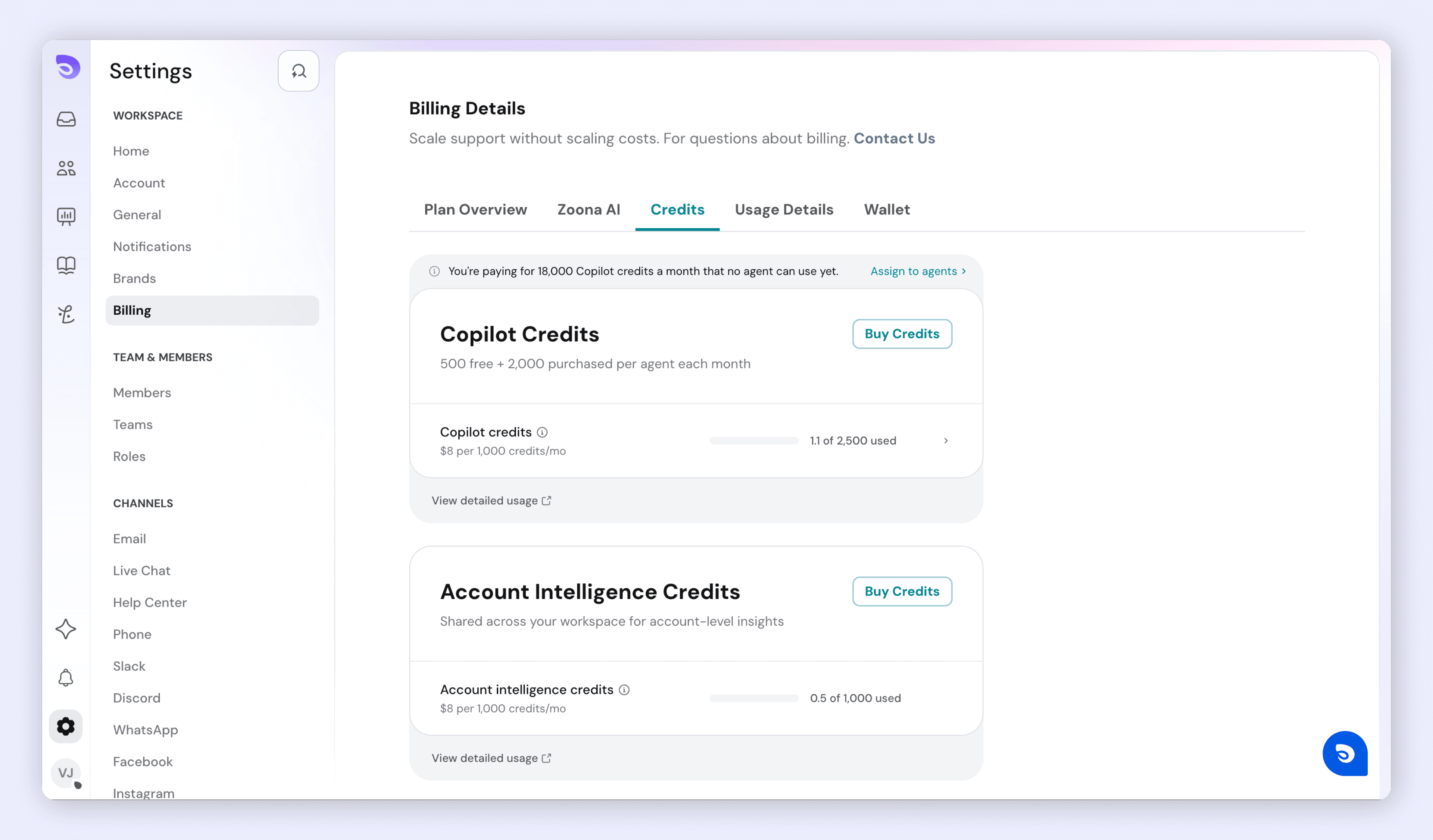
AI Copilot is paid for with credits, not seats. Every paid plan includes free Copilot credits each month for each agent with Copilot access, and you can buy more in packs of 1,000 credits. See the pricing page for current amounts. The Free plan doesn't include AI Copilot. When you give an agent Copilot access on a paid plan, they get the plan's free credits straight away. You don't need to buy credits first.
There are two kinds of credits:
- Copilot credits belong to each agent and pay for their AI Copilot use.
- Account Intelligence credits belong to the whole account and pay for AI actions that run for the account, such as the Conversation summary workflow action.
How credits work
- Credits reset every month, on both monthly and yearly plans.
- Credits you add arrive in full straight away and last until the end of that credit month.
- The charge for added credits is prorated for the rest of your billing period. The order summary shows what's Charged today.
- You choose who has Copilot, and how many credits each agent gets, from Billing → Copilot. Use Buy credits to assign agents and amounts.
- Turning off an agent's Copilot switch on the Members page only stops them using AI Copilot. They keep their credits and stay on your bill, and appear with a No Copilot access label in Billing → Copilot. Turning the switch back on gives them everything they had.
- To remove an agent's credits, use the trash icon in Billing → Copilot. From next month the agent has no credits, any unused paid credits go back to the account, and your bill drops. Deleting an agent or making them a Lite member does the same.
Note: Copilot seats can no longer be bought. Accounts that still have seats move to credits at their next renewal, and are emailed beforehand to choose a pack.
AI Resolutions
What is it?
AI Resolutions are billed on a usage-based model. Each “resolution” means an issue solved fully by SparrowDesk’s AI.
How Zoona AI Is Charged
Your account is billed on one of two models. The Zoona AI card under Billing shows which one you’re on.
Model | You're charged when | Price |
|---|---|---|
Resolution-based | Zoona resolves a conversation | $0.49 per resolution |
Conversation-based | Zoona handles a conversation. The same conversation within 24 hours counts once | $0.10 per conversation |
Trial: new accounts get 30 free resolutions, or 50 free conversations on conversation-based pricing. This is a one-time grant and doesn’t renew each month. When it runs out during a trial, Zoona stops answering and new conversations go to your team.
Postpaid: the default once you’re on a paid plan. Nothing is charged upfront, and usage is billed at the end of each billing period.
Prepaid: you can instead buy a monthly amount of credits upfront. When they run out, Zoona keeps answering and further usage is billed per use.
Usage Cap and Alerts
In Billing → Zoona AI, you can set a usage cap for each billing period, set an alert level, and choose which admins are emailed when usage gets close.
When usage reaches the cap, Zoona stops answering and hands new conversations to your team. Buying more credits doesn’t lift a cap. Raise or remove the cap instead.
Tracking usage
- Go to Settings → Billing.
- Click the Usage Details tab.
See Which Conversations Used Zoona AI Credits
The credit usage drawer lists the conversations behind your Zoona AI charges, so you can match what you were billed to the conversations that were resolved.
- Go to Billing → Zoona AI
- Click View resolved conversations.
- To see an earlier billing cycle, open the Billing period dropdown and choose a period.
The dropdown lists the current period first, then earlier periods, newest first. The selected period has a tick next to it. It shows up to 24 earlier periods.
Each row shows the conversation’s #ID. Click a row to open the conversation on top of the drawer.
Earlier billing periods are available on postpaid accounts only. For a past period, the list shows only the conversations that period’s invoice charged for.
The table lists each billed item, such as seats and AI usage, with its usage, pricing, and total. Estimated Cost at the bottom adds them up.
Reversed Resolutions
If a resolution was reversed, it still appears in the list with a Reversed label. That way every unit on your invoice is accounted for.
Usage emails
When it's sent | Who gets it | |
|---|---|---|
Usage at 90% | 90% of your free credits are used | Owner and all admins |
Trial credits used up | A trial has used all its free credits; Zoona stops answering | Owner and all admins |
Credits used up | Prepaid credits are gone; usage is now billed per use | Owner and all admins |
Usage cap alert | Usage nears or reaches the cap you set | Owner and the admins you chose |
Bi-weekly summary | Every 2 weeks, if Zoona was used | Owner |
Example
- You’re on the Professional Annual or Monthly plan with 10 teammates.
- You buy extra Copilot credits for one agent mid-month. You're charged a prorated amount today, and the agent gets the full credits straight away.
- That month, Zoona resolves 45 conversations on resolution-based pricing, billed at $0.49 each." Remove "If you have free credits left, the first 30 are free
Both charges (Co-pilot and AI Resolutions) will appear together on your consolidated invoice.
FAQ
- How do I check what a past invoice charged for?
Go to Billing → Zoona AI → View resolved conversations, and pick the invoice’s period from the Billing period dropdown. - How far back can I see?
Up to 24 earlier periods, on postpaid accounts only. - Why does the dropdown say “No earlier billing periods yet”?
Your account has only one billing period so far. - Why is a conversation marked Reversed?
Its resolution was reversed. It stays listed so every unit on your invoice is accounted for. - How is AI Copilot priced?
Per seat, by credit tier: from $8 per seat for 1,000 credits up to $160 per seat for 20,000 credits. Above 20,000 credits, contact us for custom pricing. - Do my 30 free AI resolutions renew every month?
No. They're a one-time trial grant. - Why did Zoona stop answering?
Either your trial credits ran out, or usage reached the cap you set. Raise or remove the cap in Billing → Zoona AI. - If I turn off an agent's Copilot access, do they lose their credits?
No. The switch on the Members page keeps their credits. To remove them, use the trash icon in Billing →
Was this helpful?