
Set Up and Use the AI Agent API

The AI Agent API lets you connect to your Zoona AI Agent over HTTP, so it can answer customers from any backend, app or custom channel you build.
Field-by-field request and response details live in the AI Agent API reference.
How the API channel works
The API is one channel of your AI Agent, alongside Chat, Email and WhatsApp. The same agent answers everywhere: its knowledge, commands, tone and hand-off rules stay the same. The API channel just exposes it over HTTP.
The flow is asynchronous. You send a message, SparrowDesk returns 202 Accepted immediately, and the AI's answer arrives seconds later at your webhook as an agent_replied event.
The AI's answer is never in the HTTP response. /start and /reply only confirm that SparrowDesk received your message. You must run a webhook receiver to get the reply, and there is no polling endpoint.
Before you start
You need three things:
- The API channel deployed on your agent.
- An HTTPS webhook endpoint to receive replies.
- Your API key and webhook signing secret.
Enable the API channel
- Go to Settings → AI Agents and open your agent.
- Open the API channel.
- Under Authentication & Webhook, copy your API key with the copy button. It was created with the agent, and the copy button always copies the full key, so you can come back for it later.
- Turn on Enable webhook, enter your Webhook URL (it must start with https://), and copy the signing secret (format whsec_…).
- Click Deploy Agent. Until the channel is deployed, requests are rejected with 422.
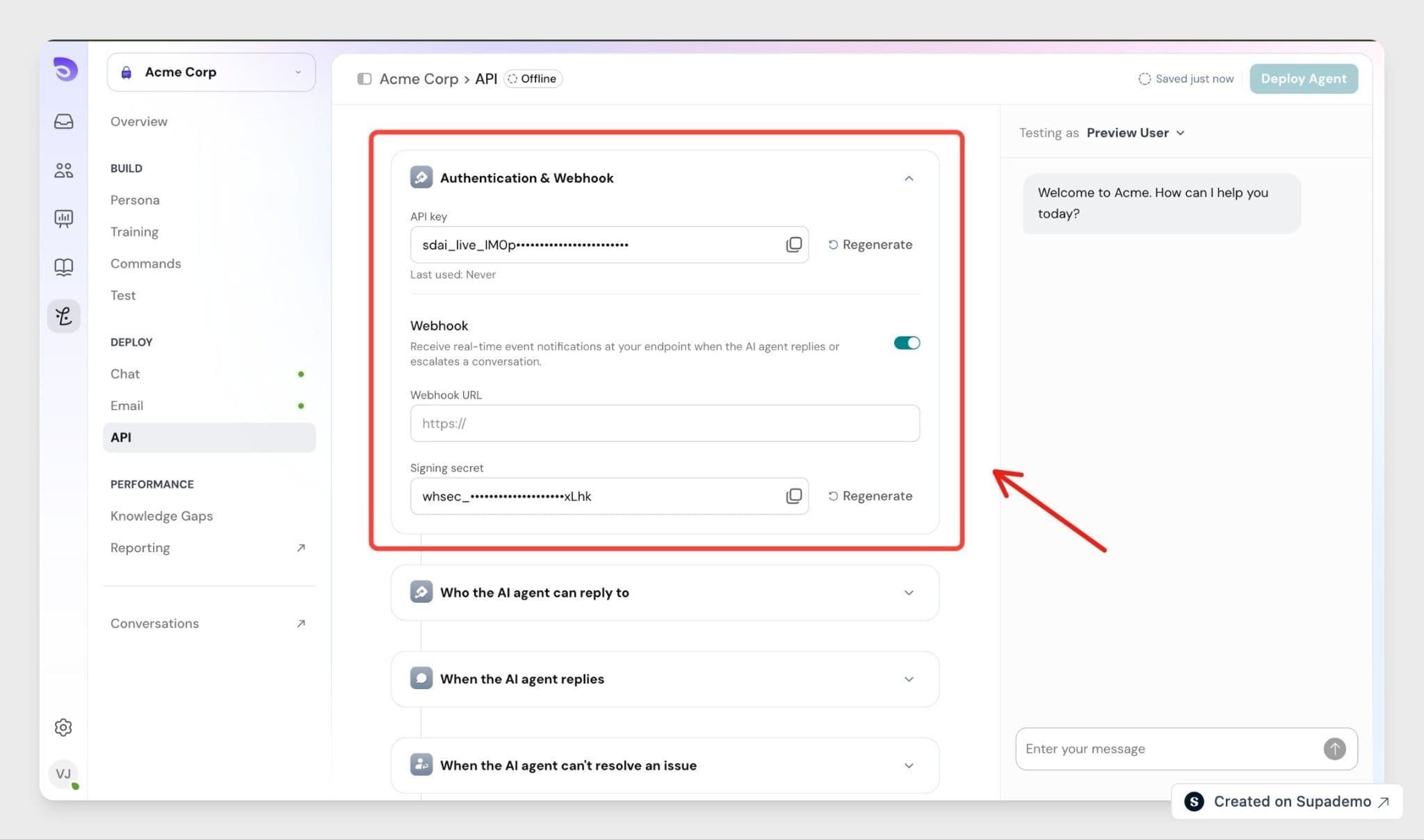
Changes on this page are saved as a draft and only take effect when you deploy. If you edit the webhook later, click Publish Changes.
Regenerate with care
Regenerating the API key or signing secret replaces it immediately, with no overlap period. Requests using the old key start failing with 401 right away, so update your systems at the same time.
Authenticate
Send your API key as a Bearer token on every request:
Authorization: Bearer sdai_live_<accountId>_<random>
Content-Type: application/json
Base URL: https://app.sparrowdesk.com/v1
Start a conversation
Send the customer's first message to /zoona/start:
curl -X POST "https://app.sparrowdesk.com/v1/zoona/start" \
  -H "Authorization: Bearer sdai_live_…" \
  -H "Content-Type: application/json" \
  -d '{
    "user": { "id": "ext-user-42", "email": "[email protected]" },
    "message": { "body": "How do I reset my password?" }
  }'
The 202 response returns a conversation_id (format tk_<id>) for follow-up replies, plus a session_token and identity_state. Pass user.email to tie the conversation to a known contact, and identity_state returns identified; otherwise it is anonymous.
To bring the same end user back in a future conversation, send the same user.id or the session_token from an earlier /start. When you send user.id, the token returned is that same id, so you only need to store one of them.
Reply to a conversation
Continue the same conversation with /zoona/reply:
curl -X POST "https://app.sparrowdesk.com/v1/zoona/reply" \
  -H "Authorization: Bearer sdai_live_…" \
  -H "Content-Type: application/json" \
  -d '{
    "conversation_id": "tk_12345",
    "message": { "body": "It still will not let me in." }
  }'
Receive the AI's reply
Every conversation event is POSTed to your webhook URL. Read the AI's answer from data.body on the agent_replied event:
{
  "id": "evt_98765",
  "type": "agent_replied",
  "conversation_id": "tk_12345",
  "sequence": 3,
  "data": { "reply_id": 999, "body": "Open Settings → Security → Reset password…" }
}
A typical turn sends three events in order: agent_thinking, then agent_replied, then awaiting_user_reply. Handle two other outcomes as well:
- conversation_escalated means the agent handed the conversation to your team, and it stops replying from that point. When data.reason is not reply_to_filter or technical_error, it holds the message the agent wrote for the customer, so show it to them.
- conversation_failed means processing failed. Let the customer retry.
The answer is text, not HTML, so escape it before rendering it in a web page. Ignore any event type you do not recognise.
Verify every delivery
Each delivery carries two headers:
Header | Value |
X-SparrowDesk-Agent-Signature | sha256= followed by a lowercase hex HMAC |
X-SparrowDesk-Agent-Timestamp | Unix time in seconds for this delivery |
The signature is HMAC-SHA256 of <timestamp>.<rawBody>, keyed with your signing secret. Compute it over the raw body bytes before parsing, compare in constant time, and reject deliveries whose timestamp is more than 300 seconds off your clock.
/const expected = "sha256=" + crypto
  .createHmac("sha256", signingSecret)
  .update(`${timestamp}.${rawBody}`)
  .digest("hex");
Retries
A delivery succeeds on any 2xx response. SparrowDesk makes up to five attempts in total: the first immediately, then 1 minute, 5 minutes, 30 minutes and 2 hours after each failure. Every attempt carries the same id, so store processed ids and skip repeats. Return 2xx quickly and do the work afterwards.
FAQ
- What happens if my webhook endpoint is down when the AI replies?
SparrowDesk retries up to five times: 1 minute, 5 minutes, 30 minutes and 2 hours after each failure. Each retry carries the same event id, so deduplicate on it. - I deployed the channel but receive no events. What should I check?
Confirm the Enable webhook switch is on, your URL starts with https://, you clicked Publish Changes after editing, and your endpoint returns 2xx. - Why do I get a 422 saying the API channel is not enabled?
The channel is not deployed, or the agent was unpublished. Open the API channel and click Deploy Agent. - Does the API channel use the same key as my other SparrowDesk API keys?
No. The AI Agent API uses a dedicated key (format sdai_live_…) that you rotate or revoke on its own. - How do I continue the same customer's conversation later?
For the same conversation, keep calling /reply with its conversation_id. For a new conversation with the same person, send the same user.id, or the session_token from an earlier /start. - What happens after the AI hands it off to a person?
The AI stops replying in that conversation. Messages you send with /reply are still accepted and reach your team in SparrowDesk, but your team's replies are not sent to your webhook. - Will my end users receive emails?
If you pass user.email, SparrowDesk treats it as the customer's email for that conversation and sends replies to it, as it does on any conversation with a requester email. Leave it out if you do not want that. - Will my AI Agent's commands run on the API channel?
Only commands enabled for the API channel. Turn one on under AI Guidelines → (command) → Enable for → API. New commands are enabled on all channels by default. - What are the rate limits?
Each API key allows 60 requests per minute, and a 429 includes Retry-After: 60. Your account's overall quota also applies and is reported in the X-RateLimit-* response headers.