
Understanding the Voice Report

The Voice report shows how many calls came in, what happened to each one, how long callers waited for a person, and how each agent handled calls. Use it to see whether your team is keeping up with call demand, and who to call back.
What You Need First
- Phone set up with at least one number. See Phone Calls in SparrowDesk.
- The Reports permission.
Open the Voice Report
- Go to Reports.
- Select Voice.
- Set the date range in the top-right corner.
How Calls Are Counted
- Only finished calls count. A call in progress is counted once it ends.
- A call belongs to the date it started.
- Every incoming call has one outcome: Answered, Voicemail, Abandoned or Missed.
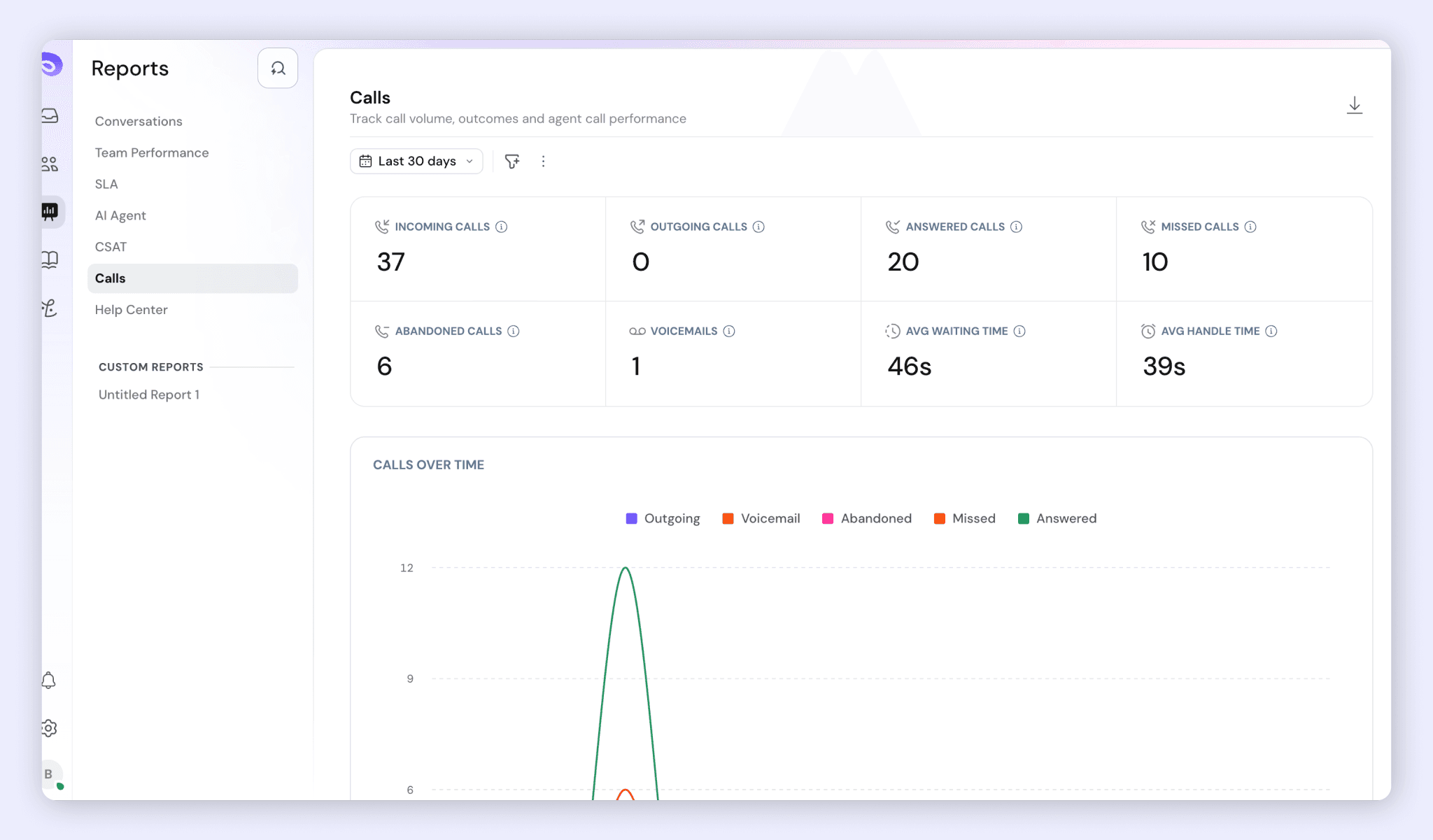
- The outcomes always add up: Incoming calls = Answered + Missed + Abandoned + Voicemails.
- Every number can be clicked to see the list of calls behind it.
Key Metrics
Metric | What it shows |
Incoming calls | Every call customers made to your numbers, whatever happened to it. |
Outgoing calls | Every call agents made, whether or not the customer picked up. |
Answered calls | Callers who reached someone, an agent or the AI agent. A call is counted once, even if it was missed by one agent first or later transferred. |
Missed calls | Calls no agent picked up. Either the call ended because no agent answered, or the caller hung up while it was ringing for an agent. Click the number to see who to call back. |
Abandoned calls | Callers who hung up while waiting: in the queue, in the IVR menu, or during the voicemail greeting. |
Voicemails | Callers who left a message. A caller who hangs up during the greeting counts as Abandoned. |
Avg answer time | How long callers waited, on average, before an agent picked up. |
Avg handle time | How long calls lasted, on average, after an agent picked up, including time on hold. |
Avg answer time includes time in the IVR menu, the queue, and rings that other agents missed, because the caller was waiting the whole time. It only counts incoming calls.
Calls answered only by the AI agent are left out of Avg answer time and Avg handle time. If the AI agent hands a call over, the wait is measured to the agent's pickup.
Calls Counted as Missed
A call is counted as Missed when:
- the agent who was rung didn't pick up, and nobody else was tried
- several agents were rung in turn and none picked up
- the caller hung up while an agent was still ringing
- no agent was available, so nobody was rung
- the caller hung up during the welcome message
- the call was ended by your setup on purpose: an IVR hang-up step, an after-hours message that ends the call, an empty Voice Wallet, or incoming calls turned off for the number
- the caller asked for a callback instead of waiting
These calls count as Missed so you still see them and can call those customers back.
Calls Over Time
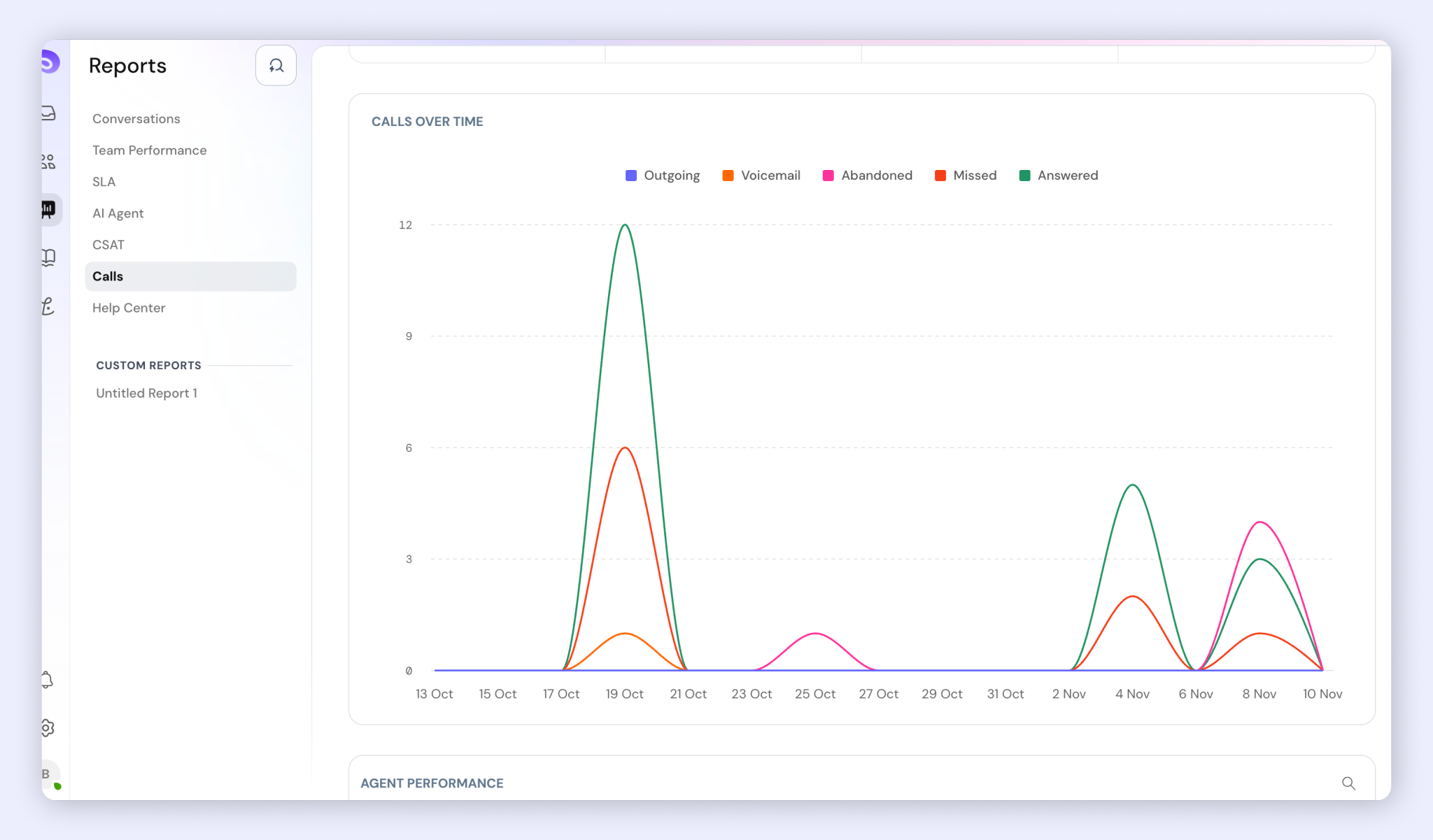
A line chart with one line each for Answered, Missed, Abandoned, Voicemail and Outgoing calls. Use it to spot busy days and days with many missed calls. A one-day range shows hours, and longer ranges show days or months. Click a point to list the calls with that outcome.
Answer Time Breakdown
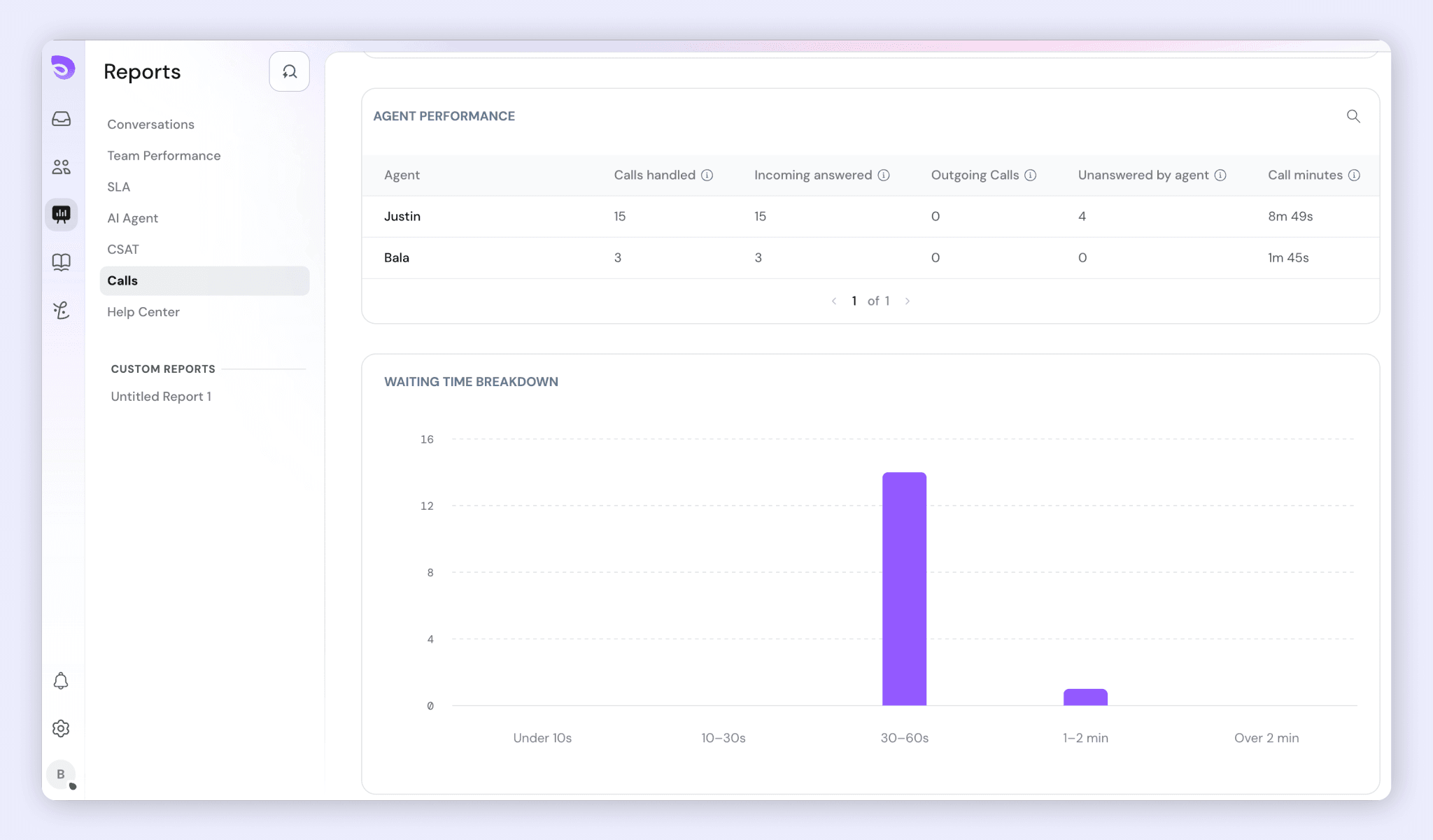
Shows how many answered calls fall into each waiting time range. An average can hide a few very long waits: an average of 40 seconds can mean most calls were answered in 10 seconds while a few waited 3 minutes.
Range | Answer time |
Under 10s | 0 to under 10 seconds |
10–30s | 10 to under 30 seconds |
30–60s | 30 to under 60 seconds |
1–2 min | 60 to under 120 seconds |
Over 2 min | 120 seconds or more |
Most calls should fall in the first two ranges. A tall Over 2 min bar is worth looking into.
Agent Performance
The table has one row for each agent who was rung on, or joined, at least one call in the period. Click any cell to list that agent's calls.
Column | What it shows |
Calls handled | Calls the agent took part in: answered, received as a transfer, or joined as a conference. |
Incoming answered | The incoming calls among the agent's calls handled. |
Outgoing calls | Calls the agent placed, whether or not the customer picked up. |
Unanswered by agent | Times a call rang the agent and they didn't pick up. |
Call minutes | Total time the agent spent on calls, including hold. |
Avg call duration | Call minutes divided by calls handled. |
Calls transferred | Calls the agent passed to another agent. |
Conferences joined | Times the agent was brought in to help on someone else's call. |
Missed Calls and Unanswered by Agent
These two are counted differently:
- Missed calls are counted once per call: did the caller get help?
- Unanswered by agent is counted once per agent rung: did this agent pick up?
So one call can make several agents Unanswered, and an agent can be Unanswered on a call that a teammate answered. For example, if Agent A misses a call and Agent B then answers it, the call is Answered, and Agent A gets Unanswered by agent +1.
Unanswered by agent covers declining, letting it ring out, the caller hanging up while it rang, a teammate answering first, and not picking up a transfer or conference invite. A high number can mean an agent is away from their desk while marked available.
FAQ
- Why don't the outcomes add up to Incoming calls?
They always should: Incoming = Answered + Missed + Abandoned + Voicemails. Calls still in progress aren't counted until they end. - Are calls handled by the AI agent counted?
Yes, as Answered. They're left out of Avg answer time and Avg handle time, so the AI agent doesn't make your team's times look faster. - Why is a callback request counted as Missed? The caller didn't reach anyone on that call. Counting it as Missed keeps it in the list of customers to call back.
- What's the difference between Missed and Unanswered by agent?
Missed is counted once per call. Unanswered by agent is counted once for every agent who was rung and didn't pick up. - Does Avg handle time include hold time?
Yes. It covers incoming and outgoing calls from pickup to the end of the call, including time on hold. - Can I see the calls behind a number?
Yes. Click any number in the report to see the list of calls.
Was this helpful?